Traffic Spikes During Seasonal Campaigns: How to Stop Losing Sales to Slow Support
Your Shopify store can handle Black Friday traffic and still lose sales. Here's why unanswered questions cost more than a site crash — and how to close that gap before your next campaign.

When traffic spikes during Black Friday, Cyber Monday, or any seasonal campaign, the real risk isn't your site going down — Shopify handles massive traffic surges without breaking a sweat these days. The risk is that a shopper with a last-minute question (Is this in stock in my size? Will it arrive before Christmas? Can I stack this code with the sale?) doesn't get an answer in the few minutes they're still ready to buy — and leaves. This article breaks down why that attention gap is the real bottleneck of peak season, what it reveals about your store, and how an AI agent that knows your catalog in real time closes it without forcing you to triple your support team for one weekend a year.
Your Store Can Handle the Traffic and Still Lose the Sale
If you've run a Shopify store through more than one peak season, you already know the platform is rarely the problem. Shopify is built to absorb traffic spikes an order of magnitude above a normal day. The problem that keeps repeating, season after season, is harder to spot on an analytics dashboard: during your highest-traffic hours, shopper questions come in faster than your team — or you — can answer them.
That unanswered question isn't a minor detail. It's very likely the number one reason your conversion rate dips in exactly the days you have the most qualified traffic. A shopper arriving from a Black Friday ad is already in buying mode. If they have a specific question — stock, size, shipping cutoff, whether a code still works — and nobody resolves it in the next few minutes, they don't come back tomorrow. They buy from the store that answered them in time.
This isn't another generic "get your site ready for Black Friday" checklist. It's a closer look at that attention gap specifically: why it happens, what it actually costs in lost sales, and what closes it without hiring and training seasonal staff every November just to let them go in January.
Why Seasonal Traffic Spikes Create Spikes in Unanswered Questions
Three things combine during seasonal campaigns to make the attention gap worse than on any ordinary day:
Volume doesn't climb gradually — it jumps. Traffic from a Black Friday campaign or a seasonal product launch doesn't build up slowly; it multiplies within hours. A team sized for the store's normal traffic gets overwhelmed almost immediately, no matter how good they are.
The questions themselves change. During peak season, you don't just get more of the usual questions (order tracking, return policy) — new, urgent ones tied to the campaign itself show up: Is this discounted item still in stock? Is the code still valid? Will it arrive before the shipping cutoff? These are purchase-blocking questions, not things a shopper will research on their own.
The decision window shrinks. A shopper who clicked through on a deal with an expiration date doesn't have the patience to wait for a support email that gets answered in 24 hours. If they don't get an answer while they're still on the product page or in checkout, they leave — and most don't come back.
The result is predictable: an overwhelmed support team prioritizes what's operationally urgent (orders already placed) and leaves what's commercially urgent — pre-purchase questions — unanswered. That's exactly the combination that turns a high-traffic campaign into a disappointing conversion rate.
The Real Cost: It's Not the Crash, It's the Unanswered Minutes
Here's the angle most Black Friday prep guides skip entirely: they calculate the risk of your site crashing or running out of stock, but they never put a number on what each minute costs when a ready-to-buy shopper gets no response.
Try it with your own numbers for a second: take your estimated Black Friday traffic, your usual conversion rate, and estimate what share of visits arrive with a question before they commit — for most stores with a catalog that isn't trivial (sizes, variants, multiple suppliers, international shipping), that share isn't small. Every one of those unanswered questions is, literally, a sale you'd already nearly closed that walked away because of a service gap, not a lack of interest in the product.
That's different — and more expensive — than losing a sale to low traffic. These are shoppers who already showed up, already trusted your store enough to reach out, and left over something completely avoidable. It's the kind of loss no amount of additional ad spend recovers, because the problem was never at the top of the funnel.
Why a Basic Chatbot Doesn't Close That Gap (and What Does)
The natural reaction to this problem is "let's just turn on a chatbot for the campaign." The issue is that most chatbots activated just for peak season answer generic FAQ-type questions — return policy, business hours — but can't answer the question that actually blocks the purchase: is this in stock, in my size, right now?
That's exactly the question a scripted bot can't answer well, because it has no live connection to your inventory. It either gives a generic non-answer ("check the product page for availability") that solves nothing, or worse, an outdated answer that leads to an order that later has to be canceled — reputational damage at the exact moment that shopper could have become a repeat customer.
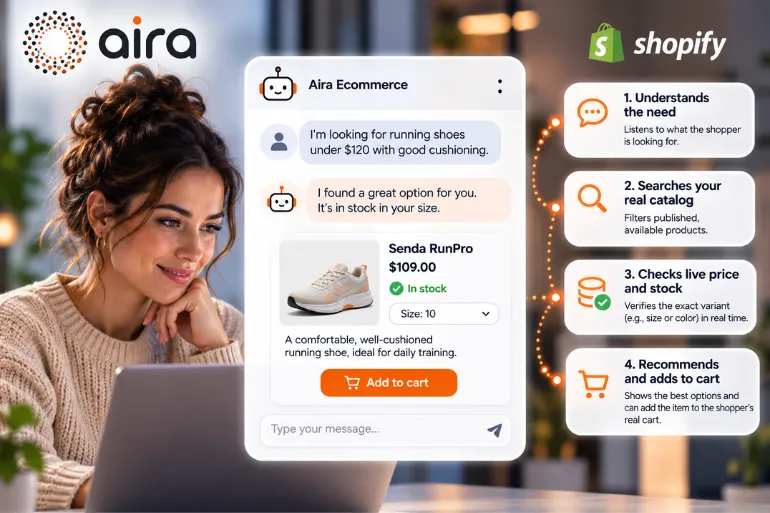
An AI agent genuinely connected to your Shopify catalog, like Aira Ecommerce, handles this differently: it checks your inventory in real time before responding, so when it tells a shopper their size is in stock, it's because it just confirmed it — not because it's repeating a script. That's what separates an assistant that slightly reduces ticket volume from one that actually recovers sales that were about to walk out the door.
How to Prepare Without Tripling Your Team Every Peak Season
You don't have to choose between "hire seasonal staff" and "leave support to chance." Here's what actually moves the needle before your next seasonal campaign:
Audit which questions repeated during your last peak season. Pull tickets and chats from the last Black Friday or campaign: what are the 10 questions that most often blocked a purchase? That list is the map of what your support system — human or AI — needs to resolve without friction.
Separate operational from commercial. Questions about orders already placed (where's my package) can wait a few minutes without costing you the sale; pre-purchase questions (stock, size, shipping, whether a code works) can't. Prioritize by where the shopper is in the funnel, not by order of arrival.
Load-test your support, not just your site. Just like you stress-test your storefront before Black Friday, stress-test your support: what happens if 50 stock questions land in the same hour?
Turn it on weeks in advance, not the day of. An AI agent connected to your catalog needs to be tested against your real inventory and your campaign policies before the spike hits — not configured in a rush the night before.
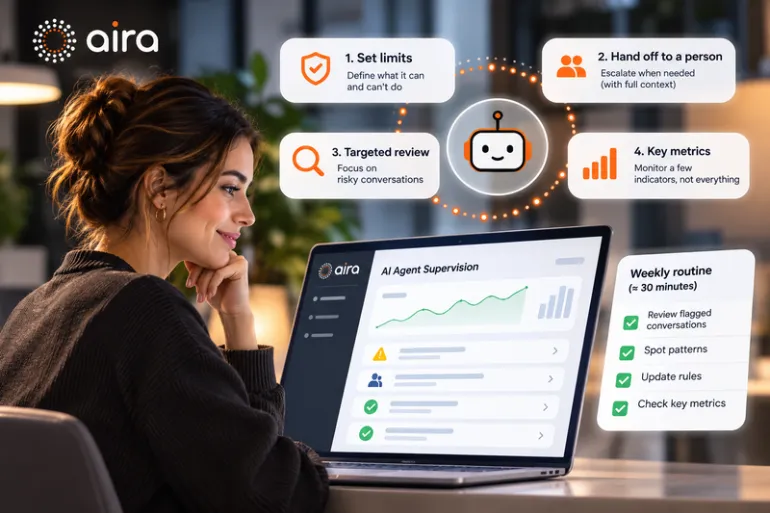
Define what escalates to a human and what doesn't. A good AI agent doesn't replace your team on the cases that genuinely need judgment — it routes them. The goal is for your human team to spend their time on what actually requires judgment, not repeating stock availability fifty times in one afternoon.
What to Review After the Campaign (and Why It Doesn't End December 1st)
Peak season gives you the most honest data you'll get all year about your customer support, because it's when the system gets tested under real pressure. Before you move on to the next campaign, review:
What share of the questions that came in during the spike got answered inside the window where the shopper was still in buying mode (minutes, not hours).
Which questions repeated the most, and whether your AI agent or your team had the right information to resolve them without escalating.
How many conversations ended in a sale versus how many went unanswered — that's the metric that actually connects customer support to revenue, more than raw ticket volume closed.
This review is what turns every peak season into a compounding improvement to the system, instead of starting from zero every November.
The Cost of Not Preparing for the Next Spike
Every seasonal campaign that passes without closing this attention gap — not within a "reasonable" support window, but within the shopper's actual buying window — is paid or earned traffic that doesn't convert, and probably converted in a competitor's store that answered in time. The good news is that closing that gap doesn't require hiring and training a seasonal team every November. It requires having a system, before the spike hits, that knows your catalog as well as you do.
Aira Ecommerce is an AI agent for Shopify stores that checks your inventory in real time, recommends products, and helps shoppers move toward checkout — with managed setup and a flat, predictable monthly fee, not a self-serve SaaS tool you have to configure yourself under pressure before a campaign.
Written by the Aira content team, specialists in conversational AI agents for ecommerce and service businesses.
Frequently asked questions
Isn't a regular chatbot enough for Black Friday?
It depends on the kind of questions your store gets. If most are generic (hours, return policy), a basic chatbot can cover a fair amount. If your catalog has variants, sizes, or limited stock per product — true for most Shopify stores during sale season — you need an agent that checks your inventory in real time, not scripted answers.
How far ahead should I turn on stronger support for seasonal campaigns?
At least a few weeks before the event, not the day of. An AI agent needs to be connected to and tested against your catalog and your campaign policies (shipping cutoffs, discount terms) before the traffic spike hits.
How do I know if I'm losing sales to slow support and not something else?
Review your support conversations from the last peak season and cross-reference how many went unanswered (or got a late reply) against your cart abandonment rate on those same days. If abandonment climbs right in your highest-traffic hours, that's a strong signal.
Can an AI agent get stock wrong during a traffic spike?
It can, if it's not connected to your inventory in real time — that's exactly the failure point of generic chatbots. An agent genuinely connected to your Shopify catalog checks real availability before answering, instead of repeating a saved response.
Does this replace my customer support team during the campaign?
It shouldn't. The goal is for the AI agent to absorb the volume of repetitive, pre-purchase questions so your human team can focus on cases that genuinely need judgment — complaints, VIP customers, off-script situations.