How an AI Assistant Recommends Products and Checks Your Inventory in Real Time
See how an AI shopping assistant recommends products and checks live price and stock on Shopify, and what it never does. Plain-English guide.
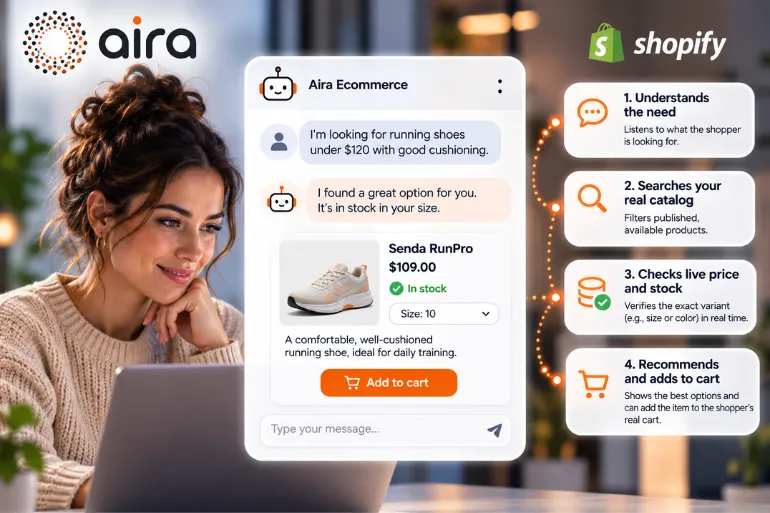
If you run a Shopify store, you know this scene. Someone asks, "Do you have this sneaker in a 10?" Nobody answers in time, and the shopper leaves for another tab. Or worse: a chat says "Yes, it's in stock," the shopper orders, and that size sold out this morning.
A well-built AI assistant prevents both. But "well-built" depends on how it checks your inventory and what it does when it doesn't know. That's what we cover here, without the jargon.
1. What an AI Assistant Does (and Doesn't Do) in a Shopify Store
An AI shopping assistant is a conversational agent that helps visitors find the right product and buy it, using the store's real data. With Aira Ecommerce, here's what it does:
Finds products by price, brand, type or name from the live catalog, showing only published, in-stock items.
Checks price and stock for the exact size or color.
Compares two or three products using only what their product pages say.
Adds the exact variant to the real cart, without the shopper leaving the page.
Answers order-status questions with the order number and the email used to buy (status and tracking only).
Points to sales that already exist in your store. It never invents a discount.
Takes back-in-stock requests by saving the shopper's email for a sold-out item.
Speaks English, Spanish, French or German, matching the shopper's language.
And here's what it doesn't do: it doesn't charge anyone or complete checkout (the shopper pays), it doesn't invent prices, sizes or discounts, it doesn't promise policies your store doesn't have, and it doesn't reveal personal data when checking orders.
A list of features is one thing. Making sure an assistant never makes up a "yes, it's in stock" is another. That's in section 3.
2. How It Recommends Products: From "I Need Something For…" to the Right Product
An assistant doesn't need to guess the customer's taste. It works in three steps:
It asks or listens for the need. For example: "I'm looking for well-cushioned running shoes under $120."
It filters the real catalog. Only published, in-stock products that match those conditions make the cut.
It presents a few options and explains why. A good recommendation is two or three products, not twenty, with the reason.
Let's be clear about one thing: the Aira Ecommerce page doesn't describe a separate recommendation engine (the "customers who bought this also bought" kind). What it does is recommend based on what the shopper says they need, matched against your catalog. If you want recommendations driven by purchase history, that's a different tool, and it's better to know that before you buy.
The practical difference: a shopper who's hesitating doesn't need to see 200 products. They need someone to say, "This one, for this reason."
3. Syncing Is Not the Same as Checking Live
This is the part people confuse most, and the one that affects your sales most. There are two ways an AI can "know" what you have in stock:
Sync | Live check | |
|---|---|---|
What it is | A copy of your catalog, refreshed every so often | Asking Shopify at the moment of the answer |
Example | "I read your catalog every hour" | "Right now, is the size 10 in black in stock?" |
Good for | Descriptions, categories, product pages | Price and stock |
Risk if it's the only method | Saying "in stock" about something that sold out 20 minutes ago | — |
Here's how Aira does it: it reads the catalog every hour and the blog every night (to learn your store), but price and stock are checked live, and the page states it doesn't store them or quote them from memory.
It makes sense: a product description rarely changes, while the stock of one size can change in minutes. If an assistant uses a copy for that, sooner or later it will say "yes" when the answer is "no." That's a lost sale and a customer who stops trusting you.
A simple rule for evaluating any tool: ask "Do you check stock and price at the moment of the answer, or do you have them stored?" If they can't answer, you have your answer.
But checking stock isn't enough if the AI can't tell size from color. That's the next point.
4. The Exact Variant and the Real Cart
A "sneaker X" doesn't exist as such in Shopify. Variants exist (size 10 black, size 11 white…). An assistant that checks stock for "the product" and not the variant gives you a "yes" that means nothing.
That's why the control that matters is at the variant level: it checks availability for the exact combination and, when the shopper says "OK, I want it," it adds that variant to the real cart without leaving the page. From there, the shopper pays as usual at your checkout.
Two practical effects:
Less friction: from "Do you have it in my size?" to the cart in a single conversation.
Fewer mistakes: nobody buys a size 10 that doesn't exist.
5. What Happens When It's Out of Stock or Doesn't Know
A reliable assistant shows its quality most in what it does when it can't help:
Sold-out product: it can capture the shopper's email to notify them on restock (instead of letting them walk away).
A policy your store doesn't have (a warranty, for example): it doesn't make one up. Answers about shipping, returns and warranty come from your own pages; if they aren't there, the question goes to your team.
Complaints, returns or unanswered questions: they're emailed to your team with the full conversation, so nobody has to repeat their problem.
Order lookups: they require the order number and the email used at purchase; after three failed attempts, lookups lock for one hour.
This separates a useful assistant from one that "looks good in the demo" and causes trouble in real life. And if you want to see how to keep an eye on all of this afterward, our article on how to supervise AI agent responses covers a 30-minute weekly routine.
6. What It Needs From Your Shopify Store and How It's Installed
Permissions: read-only access to products, inventory, pages and orders. It doesn't modify your catalog.
Where it learns from: your catalog, your blog, and your shipping and returns pages.
Installation (done by Aira's team, not you):
Your Shopify store is connected.
Aira learns your store.
The team tunes tone, recommendations and handoff rules with you.
You paste one line of code into your store.
There's no app to configure and no flows to build. Each store gets its own assistant and its own database.
Platforms: Shopify is available today. WooCommerce is listed as "coming soon."
7. What It Costs
$1,499 one-time setup (covers connection, training and the first month) and $385 per month starting in month two (covers the AI, hosting, hourly sync, a weekly report and ongoing tuning). There are no per-conversation fees and no minimum commitment: it's month to month.
To put it in context: the question isn't "How much does the assistant cost?" but "How much does every visit that asks something and leaves without an answer cost?" In a store with real traffic, that usually weighs more than $385.
Context: according to the Baymard Institute (average of 50 studies, 2025), 70.22% of online carts are abandoned before checkout; among the recurring reasons are an unsatisfactory returns policy and not being able to see the total cost up front.
8. Three Common Doubts From Store Owners
"Why not use a cheaper (or free) app?" A free self-serve chat is a good starting point, and for some stores it's enough. What Aira adds is that the team sets it up for you, it's proactive (it opens the conversation based on the page the visitor is on and speaks up when someone is about to leave with a full cart) and it sends you a weekly report. If you have the time to configure and measure it yourself, the cheap app may be enough. If not, the cost is your time.
"Will it work with my catalog?" It learns from your real catalog and pages. What it does need is an up-to-date catalog: if your product pages are a mess, the assistant will reflect that mess.
"Will it hurt the shopping experience?" It's tuned before launch: the team adjusts tone and handoff rules with you, and you decide when it goes live.
9. A 6-Question Checklist for Evaluating Any AI Assistant for Shopify
Does it check price and stock at the moment of the answer, or use a copy?
Does it check stock per variant (size/color)?
Does it only recommend published, available products?
What does it do when it doesn't know or the product is sold out?
Where does it get policies (returns, shipping)? Does it make them up if they're missing?
What access does it ask for on your store, and can it change anything?
Self-check: could you answer all six questions today about the tool you use (or are evaluating)? If you're unsure about any of them, that's your first task.
At the start I told you there was a difference almost nobody explains: syncing the catalog is not the same as checking live. Now you have it: the description can come from a copy; price and stock can't.
An AI assistant isn't worth it for "having AI in the store." It's worth it so a hesitant shopper gets a correct answer, in their size, right now, and makes it to the cart.
Frequently asked questions
Can an AI assistant complete the purchase for the customer?
With Aira Ecommerce, no. It adds the exact variant to the real cart; the shopper pays at your checkout.
Does it make up prices, sizes or discounts?
It shouldn't. It checks price and stock live and only points to sales that already exist in your store.
How often is the catalog updated?
The catalog is read every hour and the blog every night; price and stock are checked live.
What happens if a product is out of stock?
It can save the shopper's email to notify them when the item is back in stock.
Can it see my customers' orders?
Only status and tracking, and only with the order number and the email used to buy.
Is there a contract or a per-conversation fee?
No. It's month to month, with no minimum and no per-conversation fees.